 Pinvas
Install
Pinvas needs Blender 5.0.0 or newer. Blender 4.x cannot install it.
Install the add-on#
Keep the downloaded ZIP file as it is; Blender installs it directly.
- In Blender, open Edit > Preferences > Get Extensions.
- Open the menu at the top right (the small down arrow) and choose Install from Disk....
- Choose the Pinvas ZIP file. Blender installs and enables the add-on.
Blender lists two permissions for the add-on, worded "Import reference pictures from disk" and "Paste pictures and copied files onto the board".
Find the board#
- Hover over a 3D View and press N to open the sidebar.
- Open the Pinvas tab.
An empty board reads "Empty board", "Drop pictures here, or paste with Ctrl+V" and "Middle-drag to pan · Scroll to zoom".
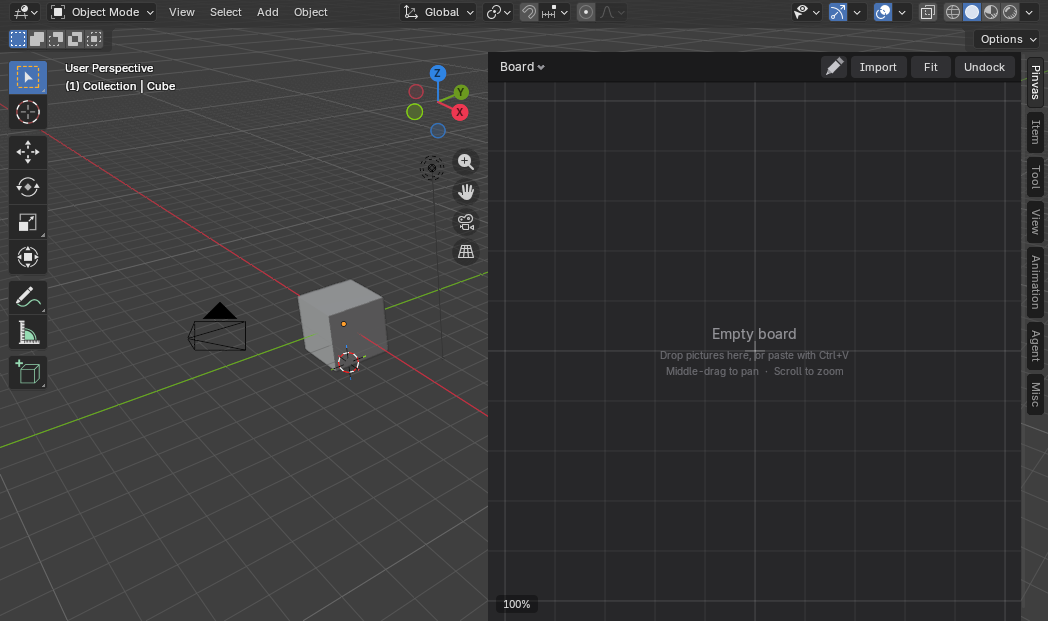
If another add-on such as a panel manager has moved or renamed the tab, look for Pinvas in the sidebar's tab column.
Update the add-on#
- Open Edit > Preferences > Add-ons, find Pinvas and choose Uninstall.
- Restart Blender.
- Install the new ZIP the same way.
Boards are saved inside your .blend files, so updating or uninstalling does not touch them. A board made in an earlier version opens in the new one.
Once the tab is there, try the quick start.