 Pinvas
Add and edit pictures
Bring pictures in#
- Import, on the board's bar, or right-click and choose Import Pictures.... Select one or many files.
- Drop picture files from your file manager onto the board. Blender asks which importer you mean, because its own Add Empty Image also takes a picture dropped on a 3D View. Choose Add to Pinvas Board. Dropped anywhere else in the viewport, Blender does what it always does.
- Paste with Ctrl+V over the board: a copied picture, a screenshot, picture files copied in your file manager, or picture file paths copied as text.
The formats are PNG, JPEG, JPEG 2000, BMP, TGA, TIFF, EXR, HDR, WebP, PSD, DDS, Cineon, DPX and SGI. Videos come in the same three ways; see Videos.
Select and transform#
| Do this | To |
|---|---|
| Click a picture | Select it (Shift+click adds or takes away) |
| Drag a picture | Move it, with the rest of the selection |
| Drag on the empty board | Box-select (Shift adds, Ctrl takes away); a click there selects nothing |
| Drag a corner handle | Scale, keeping the opposite corner still (Alt: about the middle) |
| Drag the round handle above the picture | Turn (Ctrl: 15° steps) |
| Ctrl+drag a corner handle | Crop the picture; the opposite edges stay |
| Alt+R | Straighten |
| Alt+S | Back to actual size |
A selects all and Alt+A selects none. Esc or a right-click during a drag cancels it.
The right-click menu#
Right-click anywhere on the board for every picture command, grouped so the menu stays short.
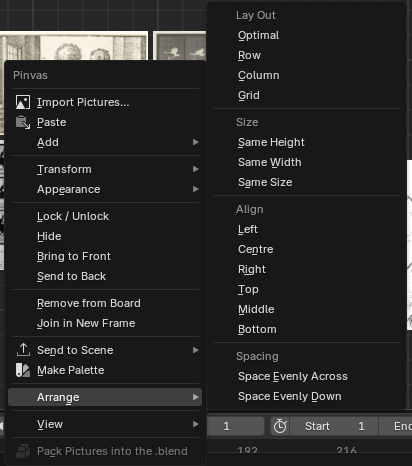
| Submenu | What it holds |
|---|---|
| Add | Note, Frame, Render Result, Viewport Snapshot |
| Transform | Flip Horizontally, Flip Vertically, Straighten, Actual Size, Uncrop, Parent to Last Selected, Release from Parent |
| Appearance | Greyscale, Opacity..., Values..., Proportion Grid |
| View | Select All, Select None, Fit All, Fit Selected, Show Hidden, Focus, Overlay |
Video holds the video commands, including Stitch, Open Stitch, Unstitch and Analyse. Send to Scene, Arrange and Make Palette are submenus or commands of their own. With nothing selected the menu holds only Import Pictures..., Paste, Add, Arrange, View and Pack Pictures into the .blend.
- Flip Horizontally and Flip Vertically mirror a picture as you see it, whatever its turn.
- Actual Size shows one picture pixel per board unit, which is 100% at 100% zoom.
- Uncrop shows the whole picture again, where it was.
- Bring to Front and Send to Back change which picture covers which.
- Remove from Board (also X or Delete) takes the selected pictures off the board.
Taking a picture off the board does not delete its image at once. It goes when the file is saved and nothing else uses it.
Move, scale and turn with the keys#
G, S and R work as they do in Blender, with the mouse over the board: click, Enter or Space keeps the change; right-click or Esc drops it. X or Y during G locks the move to that axis. Ctrl snaps (grid steps, tenth steps of size, 15° turns) and Shift makes the mouse count a tenth. Shift+D duplicates the selection and moves the copies.
While one of these runs, a hint along the board's foot lists the keys that apply.
Undo with Ctrl+Z. Every move, scale, turn and edit is one step.