Rest Start
Already positioned your object? Rest Start adds motion without moving it away from where you put it.
Why an object can jump
Your object may already sit at a carefully chosen position or angle. A template has its own range of values, and when you apply it, that range can replace the value you set. Rest Start makes the motion begin from where the object already is.
The three options
| Option | What it does |
|---|---|
| Additive — Restart from Current Value (recommended) | Keeps the object where you left it and holds it still until the frame you applied on. From that frame, the motion starts from the current value. |
| Off — Keep Scene Time | The motion follows the scene timeline from its start, as the template was designed. Motion that moves the object as a whole still stays relative to where the object is. |
| Offset Graph — Keep Scene Time | Keeps the scene timing, but shifts the whole motion so it lines up with the current value. |
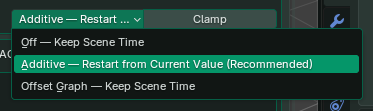
The Graph Preview’s Evaluation view shows the result with Rest Start included.
What does Clamp do?
Clamp keeps the result between a minimum and a maximum. For example, a wobble on a light with Power 10 could dip below zero; with a Clamp minimum of 0 it never goes negative. Clamping can also flatten an overshoot or cut the tops off a pulse, so adjust the template’s own range first and use Clamp when the property needs a hard limit.
Check the pivot
Espresso animates values; it doesn’t work out where a hinge should be. A door with its origin in the middle turns around the middle. Before you apply a rotation, put the origin where the object should pivot, and check its rotation and parent.