Preferences
Adjust how Driver Espresso behaves in Edit → Preferences → Add-ons → Driver Espresso. The preferences are grouped into sections.
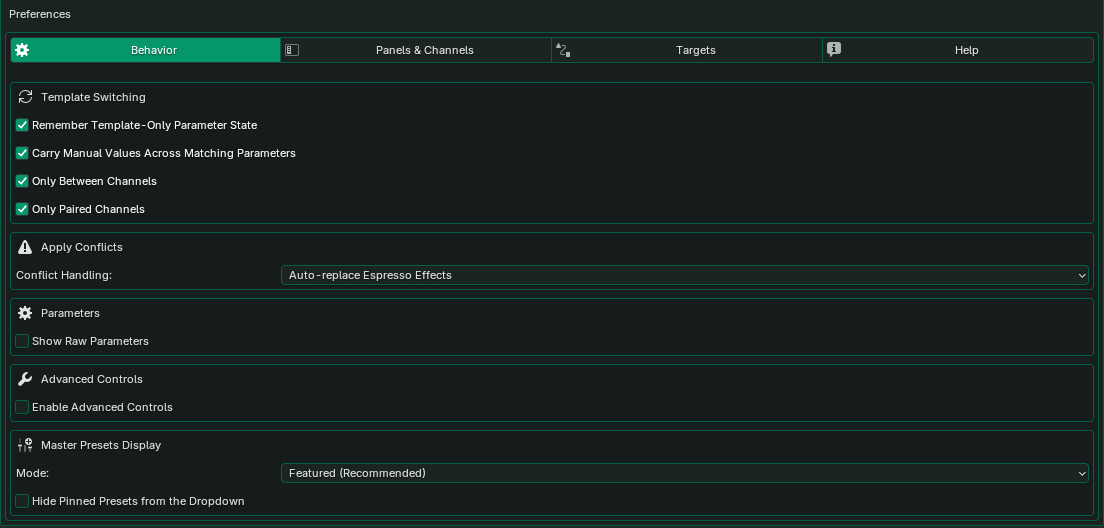
Behavior
| Setting | What it does |
|---|---|
| Remember Template-Only Parameter State | When you come back to a template, restores the values you set for controls only that template has. |
| Carry Manual Values Across Matching Parameters | When you switch templates, shared controls such as Minimum, Maximum, Period or Speed keep the value you last typed. Only Between Channels and Only Paired Channels limit this to related templates. |
| Enable Advanced Controls | Shows the ADVANCED section, with its Timing Controls and Output Controls groups, for templates that support it. |
| Conflict Handling | What happens when you apply to a property that already has an effect. Always Ask stops and lets you choose. Auto-replace Espresso Effects (the default) replaces it. Auto-layer When Supported adds the new effect on top where the property allows it. Never Prompt skips the apply without asking. Drivers that Espresso didn’t create are never replaced. |
| Master Presets | Chooses which preset buttons appear on the preset shelf, and whether presets already on the shelf are hidden from the drop-down. |
| Show Raw Parameters | Adds each control’s name in the expression to its label. Useful if you edit drivers by hand. |
Panels & Channels
Choose which parts of the panel are shown: the Preview Panel, Favorites & Recent, Variants (related and paired templates), the Subcategory Filter and Advanced Controls. Channel Display sets how a template’s channels are laid out, such as a traffic light’s green, amber and red. Diagnostics shows controller names and connection details in the Controller tab, which helps when troubleshooting.
Targets
Enable Driver Target Picker adds a list of the selected object’s drivers to the Preview graph, with an Active Target toggle so the graph can show an applied effect. Remember Apply Targets keeps the last property you applied to, so Update Last Target can apply there again. Apply Target Memory Mode chooses whether to remember only the newest target, one per kind of apply, or a recent-history list; Apply Target History Size sets how long that list is.
Some settings only appear in editions that include the feature they control.
If playback is slow
A slow viewport is usually caused by the scene, not the drivers. Heavy materials, real-time shadows, modifiers and dense geometry all add up. Compare Solid and Rendered shading: if Solid plays smoothly, the slowdown is in rendering, and changing the template won’t help. You can also hide the Preview panel while you play back a busy scene.